
Woods® Digital Timers Instructions
Woods® Brand 50015 ACDT-35 Dual Outlets Outdoor Digital Timer Instructions for Super Feeder Operation
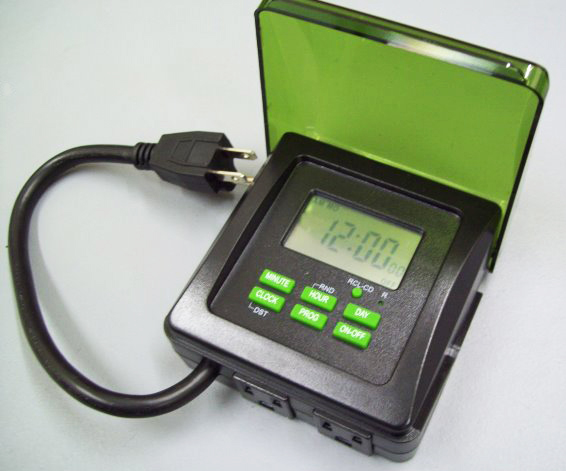
Programming the ACDT-35 for the Super Feeder only 1-2 minutes of "on" time required per feed cycle
Charge the Battery: Plug the timer into wall outlet for 10 minutes to charge internal battery. Note: You can then unplug the timer from the wall outlet and comfortably hold it in your hand to program the timer.
Clear the Memory: Press the R button with a tooth pick to erase any previous settings.
To Set the Current Time: Press and hold the CLOCK button. At the same time, press the HOUR and MINUTE button as many times as necessary to advance the display to the correct time. Hold down the DAY button until the display shows the correct day.
To Program the Timer:
- Press the PROG button once to display the first ON/OFF setting “1 ON –:–”.
- Press the MINUTE and HOUR buttons as necessary to set the ON time you want. To change from AM to PM toggle 12 times.
- Press the DAY button as necessary to choose the day or group of days you want for the time setting.
- Press the PROG button again to display the second ON/OFF setting “1 OFF –:–”.
- Repeat the procedure to create the OFF setting. Repeat Steps 1 thru 5 for additional ON/OFF settings. Press the CLOCK button to exit program setting mode.
EXAMPLE FOR FEEDER:
8:00 AM “ON” ALL DAYS OF WEEK
8:02 AM “OFF” ALL DAYS OF WEEK
Review On/Off Settings: It is important to review all 20 settings, even if you only used a few, to make sure there are not extra, unintended settings. Press the PROG button (hold down to scroll) until the display cycles through all 20 ON/OFF pairs. Stop on any setting you want to remove or change.
To Revise a Setting: Press the PROG button (hold down to scroll) until the display shows the setting you want. Press the HOUR, MINUTE and DAY buttons as necessary to revise the displayed ON/OFF time and day(s).
To Remove or Restore a Setting: Press the PROG button (hold down to scroll) until the display shows the setting you want to remove or restore. Press the RCL-CD button. If removing, the display will replace the setting with dashes. If restoring, the display will show the previous setting.
To Connect/Operate the Timer: Plug feeder adapter into the timer. Plug timer into wall outlet.
To Override the Timer: Press the ON-OFF button as necessary to display:
“ON” – the plugged in device is always ON (overrides programming).
“OFF” – the plugged in device is always OFF (overrides programming).
“AUTO ON” – the plugged in device is currently ON and will turn OFF at next programmed OFF setting.
“AUTO OFF” – the plugged in device is currently OFF and will turn ON at the next programmed ON setting. (MODE YOU WILL USE WITH YOUR SUPER FEEDER)
PLEASE NOTE THAT IF YOU ARE HAVING A PROBLEM WITH A TIMER SUPPLIED BY US, YOU DO NOT HAVE TO USE THAT TIMER PENDING RESOLUTION OF YOUR PROBLEM, YOU MAY USE ANY OTHER TIMER AVAILABLE LOCALLY TO OPERATE YOUR SUPER FEEDER®.
Download this page as a printable pdf: ACDT-35 Dual Outlet Digital Timer by Super Feed