
Woods® Digital Timers Instructions
Woods® Brand 50009 ACDT-36 Dual Outlets Digital Timer Instructions for Super Feeder Operation
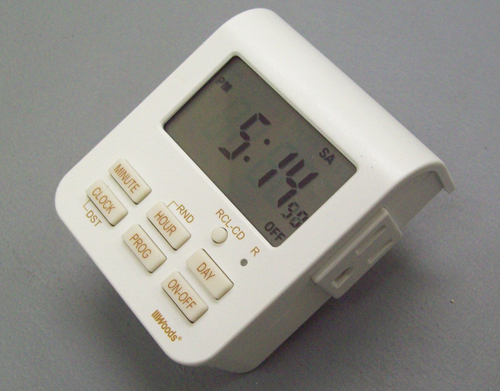
This 120V timer with dual outlets is great if you would like to operate two Super Feeders at the same time to help keep one cat from eating the food away from the other when being fed at the exact same time. You can of course use it for many other applications. Minimum switching time of 1 minute between settings, accurate-to-the-minute, pre-program for up to 20 on-off settings per day, any or all days of the weeks, daylight savings changeover, random setting for automated variable on/off times, self-recharging battery back-up to protect programming during power failures, and manual override button to trigger your feeder for additional portions or to turn on whatever else you want to power. Ratings: 120V, 15A/1875W
Before programming any timer, you must first adjust the feeder’s internal feed timer as directed in its operating manual by plugging the power adapter cord into the feeder and the power adapter directly into a power outlet. Use the small plastic screwdriver to do that.
- First, insert timer in outlet to charge timer’s internal battery for at least 1 hour before use.
- Lightly push the small recessed “reset” switch (R) with a paperclip or similar item until you see all 88:88
- Press and hold the “CLOCK” button down, push the “DAY” button repeatedly until you see the current day of week at the top of the display.
- While holding “CLOCK” button down, push the “HOUR” button repeatedly until you have the correct hour and AM or PM set in the display.
- While holding “CLOCK” button down, push the “MINUTE” button repeatedly until you have the correct minute in the display.
- You may push and hold any minute, hour or day button to speed up process. Release the “CLOCK” button when done.
To program same feed cycle(s) at the same daily time(s) all 7 days of the week:
- Push the “PROG” button (program) once and release. You should see a “1” (first feed cycle) and “ON” below the 1 in the window
- Push the “DAY” button until you see all 7 days of the week or days selected to come on and have “AM” in the window.
- Push “HOUR” button repeatedly until you have the desired hour and AM or PM in the window you want your first feed cycle to occur.
- Push “MINUTE” button repeatedly until you have the minutes set for the time you want the feeder to turn on.
- Push the “PROG” button one more time and you should see a “1” (first feed cycle) and “OFF” below the 1 to program your off time.
- Repeat steps 2, 3 and 4 to program “OFF” time 2 minutes later than “ON” time you previously selected. Example: 5:00 AM “ON” and 5:02 AM “OFF” This will be your first feeding time.
- Repeat sequences above for additional feed cycles up to 20 times per day making sure that you have at least 2 minutes of “off” time between subsequent programmed feed times. Example: You may feed twice in as little time span as 5 minutes. We recommend feeding small portions several times per day. You may double-check all programs by repeatedly pushing the "PROG" button making sure that all other on-off programs have dash lines in the display--NO NUMBERS!
- Push and release the "CLOCK" button, and then cycle the "ON-OFF" button until you have “AUTO” in the display for automatic mode.
- Now plug the feeder's power adapter into the timer and the timer into an outlet. Note: You may manually activate your feeder with the timer by selecting it to "ON" mode and then returning it to "AUTO" when feed cycle is completed. Make sure you return it to “AUTO” for automatic operation with no power light illuminated in the feeder. You may review the manufacturer's instructions for additional timer information. Super-Feed warranty on timers is for a duration of 90 days from purchase date. Any other timer can be used.
PLEASE NOTE THAT IF YOU ARE HAVING A PROBLEM WITH A TIMER SUPPLIED BY US, YOU DO NOT HAVE TO USE THAT TIMER PENDING RESOLUTION OF YOUR PROBLEM, YOU MAY USE ANY OTHER TIMER AVAILABLE LOCALLY TO OPERATE YOUR SUPER FEEDER®.
Download this page as a printable pdf: ACDT-36 Digital Timer by Woods